
TL;DR:
- Behaviorally triggered upsell offers convert at a higher rate than manual outreach, significantly boosting revenue.
- Tracking key metrics like expansion MRR and NRR helps assess whether your upsell strategies are effectively growing net revenue.
Generic upsell offers are quietly costing you money. Behaviorally triggered upsell offers convert at 35% compared to 22% for manual outreach, and that gap widens every month you rely on gut instinct instead of data. SaaS upsell analytics is the discipline of measuring, interpreting, and acting on the signals your customers already send you through their usage patterns. For e-commerce business owners and marketing professionals, understanding this framework means the difference between leaving expansion revenue on the table and building a predictable growth engine from your existing customer base.
Table of Contents
- Key Takeaways
- Core SaaS upsell metrics you need to track
- Behavioral signals that reveal upsell readiness
- Choosing the right SaaS analytics tool
- Building a data-driven upsell workflow
- Common pitfalls in SaaS upsell analytics
- My take on making upsell analytics actually work
- How Affinsy helps you find and act on upsell signals
- FAQ
Key Takeaways
| Point | Details |
|---|---|
| Behavioral triggers outperform manual offers | Automated, usage-based upsell triggers convert at 35% vs. 22% for manual outreach. |
| Track expansion MRR and NRR first | These two metrics reveal whether your upsell motion is actually growing net revenue. |
| Account-level data beats user-level data | Grouping analytics by account gives a more accurate picture of upsell readiness in B2B contexts. |
| Tool choice shapes your segmentation capability | Amplitude and Mixpanel serve different team needs; picking the wrong one limits your upsell targeting. |
| Audit your signals continuously | Stale metrics and misaligned CRM data are the most common reasons upsell programs underperform. |
Core SaaS upsell metrics you need to track
Before you can optimize anything, you need to know what you are measuring. Most teams track too many vanity metrics and too few metrics that actually connect to revenue. Here are the ones that matter.
Upsell conversion rate is the percentage of upsell opportunities that result in a paid upgrade. Average SaaS upsell conversion rates sit between 20% and 30%. If you are below 20%, the problem is usually pricing misalignment or low product adoption, not a sales execution issue.
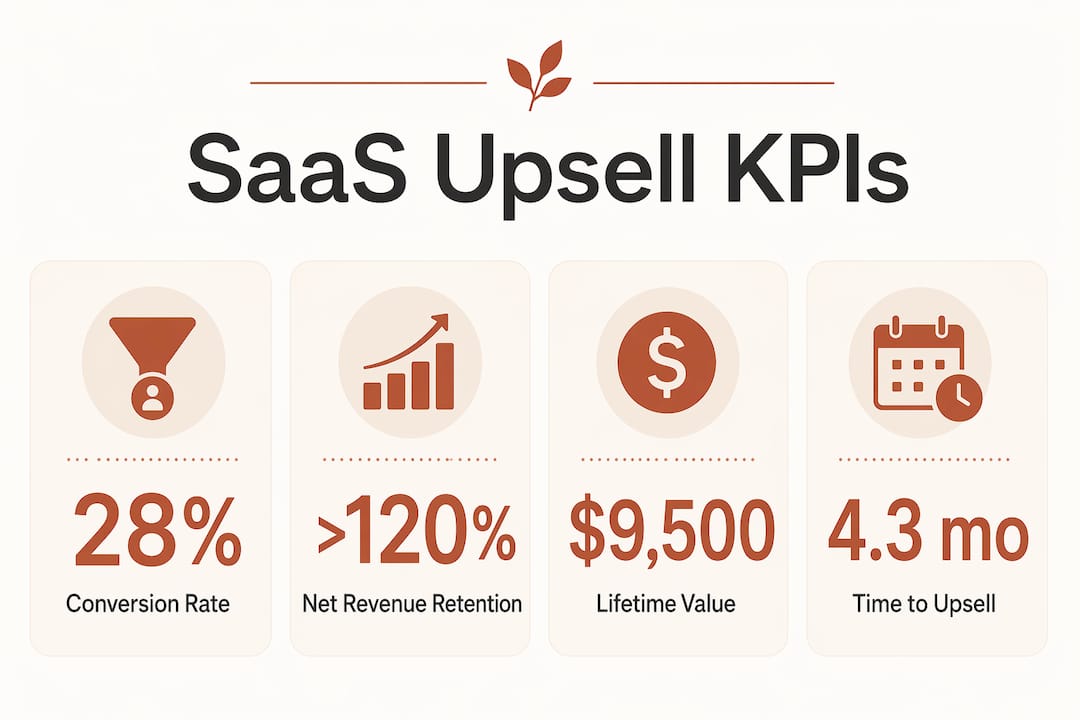
Expansion MRR measures the additional monthly recurring revenue generated from existing customers through upgrades, add-ons, or seat increases. It is calculated as: (MRR from upgrades this month) divided by (total MRR at the start of the month) multiplied by 100. A healthy SaaS business targets expansion MRR that offsets or exceeds churn MRR.
Net Revenue Retention (NRR) is the gold standard for measuring upsell health. Best-in-class SaaS companies target NRR above 120%, meaning they grow revenue from existing customers even without adding a single new account. NRR above 100% means expansion outpaces churn. Below 100% means you are shrinking even if you are acquiring new customers.
| Metric | Formula | Benchmark |
|---|---|---|
| Upsell conversion rate | (Upsells closed / Upsell opportunities) × 100 | 20–30% |
| Expansion MRR | (New upgrade MRR / Starting MRR) × 100 | Varies by stage |
| Net Revenue Retention | (Starting MRR + Expansion – Churn – Contraction) / Starting MRR × 100 | 100–120%+ |
| Customer Lifetime Value | Average revenue per account × Average customer lifespan | Varies by segment |
| Time to upsell | Days from onboarding to first upgrade | Shorter = stronger adoption |
Customer lifetime value (LTV) and time to upsell round out the picture. LTV in SaaS tells you how much revenue a customer generates over their entire relationship with you, which directly informs how much you can spend on upsell campaigns. Time to upsell reveals whether your onboarding is setting customers up for expansion or stalling them.
Behavioral signals that reveal upsell readiness
Knowing your metrics is step one. Knowing when to act on them is where most teams fall short. The customers most likely to upgrade are not the ones who have been with you the longest. They are the ones whose behavior signals they have outgrown their current plan.
The top three behavioral triggers account for 68% of automatic expansion conversions:
- Usage limit approach: When a customer hits 85–90% of their quota, they are primed to upgrade. This trigger alone converts at 3–5 times the rate of fixed renewal window offers.
- Power feature engagement: Customers who discover and repeatedly use advanced features are signaling they want more capability, not just more of the same.
- Team growth: When a customer adds new users or seats, they are expanding their footprint. That is a natural moment to introduce a higher tier.
The critical distinction here is between raw usage metrics and meaningful engagement indicators. Logging 500 events in a week means nothing if those events are all the same action repeated. Feature breadth and workflow depth are far better indicators of upsell readiness than raw login counts or total event volume. A customer using six different features across two workflows is a much stronger upsell candidate than one who logs in daily to do the same single task.
Integrating product analytics with your CRM data multiplies the accuracy of these signals. When you can see that an account has added three users, hit 80% of their storage quota, and opened your pricing page twice in the past week, you have a complete picture. Each signal alone is weak. Together, they are a clear buy signal.

Pro Tip: In B2B SaaS, always analyze at the account level, not the user level. Account-level grouping gives you an accurate view of customer health because individual user behavior inside a multi-seat account can be wildly misleading. One power user and five inactive users looks very different depending on which lens you use.
Choosing the right SaaS analytics tool
Your ability to act on behavioral signals depends entirely on the analytics tool sitting underneath your data. Two platforms dominate this space, and they are built for different teams.
Amplitude vs. Mixpanel is not really a debate about which is better. It is a question of what your team actually needs. Amplitude offers advanced behavioral cohorts, integrated experimentation, and native group analytics, making it the stronger choice if you have a data analyst or growth engineer running your upsell programs. Mixpanel is faster to set up, easier for product managers and marketers to use without SQL, and more cost-effective at smaller data volumes.
| Feature | Amplitude | Mixpanel |
|---|---|---|
| Behavioral cohorts | Advanced, native | Available, simpler |
| Group analytics (account-level) | Yes | Yes (with setup) |
| Integrated experimentation | Yes | No |
| Ease of use | Moderate | High |
| Best for | Data-led growth teams | PM and marketing-led teams |
For e-commerce SaaS operators specifically, group analytics is non-negotiable. You need to see account-level behavior, not just individual user sessions. SaaS products with self-service analytics dashboards report 23% higher net revenue retention than those relying on CSM-led reporting alone, which tells you that visibility itself drives retention and expansion.
Pro Tip: Before committing to any analytics platform, check whether it supports cohort syncing to your CRM or email tool. Without that connection, you will identify upsell-ready accounts inside the analytics tool and then have no automated way to act on them. The top ecommerce analytics platforms worth considering all offer some form of CRM integration.
Building a data-driven upsell workflow
Identifying signals is only useful if you have a system to act on them. Here is how to build one that runs without requiring your team to manually monitor dashboards every day.
-
Connect your data sources. Export product usage events into your analytics platform. Sync account and contract data from your CRM. If you are running e-commerce on Shopify, WooCommerce, or Stripe, export your transaction data and feed it into your analytics layer. This is where platforms like Affinsy add value by analyzing historical transaction patterns to surface expansion signals you would otherwise miss.
-
Define your trigger conditions. Set specific thresholds: 85% quota usage, three or more power feature activations in 14 days, two or more new seats added in a month. These become the rules that fire your upsell sequences automatically.
-
Build multi-touch sequences. A single upsell email rarely converts. Design a sequence: an in-app nudge when the trigger fires, a follow-up email 48 hours later with a specific upgrade benefit, and a third touchpoint from a customer success manager (CSM) if the account is above a revenue threshold. Automated triggers reduce median time to expansion from 30-plus days to under 48 hours.
-
Route high-value accounts to CSM. Not every upsell should be fully automated. Accounts above a certain contract value or with complex expansion signals deserve a personal conversation. Your analytics system should flag these automatically so your CSM team can prioritize without manually reviewing every account.
-
Track and refine. Monitor upsell conversion rate by trigger type, by segment, and by message variant. Effective upselling requires cross-functional alignment between marketing, sales, and customer success. If one trigger type consistently underperforms, investigate whether the offer matches the signal or whether the timing is off.
Pro Tip: Automate retail analytics and upsell workflows free up significant CSM capacity. Upsell automation can recapture approximately 18 hours per CSM per week previously spent on manual monitoring. Redirect that time toward high-value account relationships, not spreadsheet reviews.
Common pitfalls in SaaS upsell analytics
Even teams with good intentions make mistakes that quietly drain upsell revenue. These are the ones that show up most often.
- Relying on renewal dates instead of usage triggers. Timing your upsell outreach around contract renewal is a missed opportunity. Customers are most receptive when they are actively hitting limits or discovering new value, not when an arbitrary calendar date arrives.
- Confusing event volume with engagement. High event counts feel like a positive signal, but they can mask shallow usage. A customer generating 1,000 events from one feature is less ready to expand than one generating 400 events across eight features.
- Ignoring account-level data. Individual user metrics inside a multi-seat account create a distorted picture. One highly active user can make a struggling account look healthy. Always evaluate upsell readiness at the account level.
- Poor CRM synchronization. If your analytics platform and CRM are not in sync, your sales team will act on stale data. An account that upgraded yesterday should not receive an upsell email tomorrow. Misaligned data wastes outreach and erodes customer trust.
Pro Tip: Schedule a monthly audit of your upsell signals and metric definitions. Product changes, pricing updates, and customer behavior shifts can all make previously reliable signals go stale. RFM-based segmentation works best when you attach a specific motion to each segment and revisit those motions regularly as your customer base evolves.
My take on making upsell analytics actually work
I have worked with enough e-commerce and SaaS teams to say this with confidence: the biggest gap is not the analytics tool. It is the gap between signal detection and action.
Teams spend months configuring dashboards and then route every upsell opportunity through a manual CSM review process that takes two weeks. By the time someone reaches out, the customer has either self-upgraded, churned, or forgotten they ever hit that usage limit. The payback period for upsell automation is typically under 30 days, with year-one ROI exceeding 3,400% in well-implemented programs. That is not a rounding error. That is a structural advantage you either have or you do not.
What I have found actually works is starting with one trigger, one sequence, and one segment. Pick the signal with the highest historical correlation to upgrades in your own data. Build a two-step automated sequence around it. Measure conversion for 60 days. Then layer in the next trigger. Teams that try to build the full system at once almost always end up with a complex setup that nobody trusts or maintains.
The other thing I would push back on is the idea that automation replaces the human touch. It does not. Automation handles the volume and the timing. Your best CSMs should be spending their recaptured hours on the accounts that matter most, not on accounts that would have self-converted anyway. That balance is where the real revenue lives.
— Mateusz
How Affinsy helps you find and act on upsell signals
If you are sitting on transaction data from Shopify, WooCommerce, Stripe, or any other platform, Affinsy can turn it into a working upsell signal system without requiring a data science team. Affinsy’s AI-powered market basket analysis uncovers which products and features your customers adopt together, so you can time upsell offers around natural expansion moments rather than guesswork. Its RFM customer segmentation engine groups accounts by recency, frequency, and monetary value, giving your marketing team the precise segments needed to run personalized upsell campaigns.
Affinsy connects via API, CSV upload, or MCP, so you can get started without any complex integration work. The predictive analytics capabilities help you forecast which accounts are most likely to expand, so your CSM team can prioritize outreach before a competitor does. The permanent free tier covers up to 20,000 line items with no credit card required, making it a zero-risk starting point for teams ready to move from manual upsell guesswork to data-driven expansion.
FAQ
What is SaaS upsell analytics?
SaaS upsell analytics is the practice of tracking and analyzing customer behavior, usage data, and revenue metrics to identify and act on opportunities for customers to upgrade to higher-value plans or add-ons.
What upsell conversion rate should I target?
Average SaaS upsell conversion rates range from 20% to 30%. Rates below 20% typically signal a pricing or product adoption problem rather than a sales execution issue.
Which behavioral signals best predict upsell readiness?
Usage limit approach (85–90% of quota), power feature engagement, and team growth account for 68% of automatic expansion conversions and are the most reliable upsell signals in SaaS.
How does NRR relate to upsell performance?
Net Revenue Retention (NRR) measures whether expansion revenue from existing customers outpaces churn. Best-in-class SaaS companies target NRR above 120%, which means upsell programs are growing total revenue even without new customer acquisition.
Should I use Amplitude or Mixpanel for upsell analytics?
Choose Amplitude if your team has data analysts and needs advanced behavioral cohorts and experimentation. Choose Mixpanel if your marketing or product team needs faster setup and easier self-service reporting without engineering support.
Recommended
- Cross Sell Strategies Step by Step for E-Commerce Growth - Affinsy Blog | Affinsy
- Data-driven sales optimization guide for e-commerce - Affinsy Blog | Affinsy
- Boost Your AOV: The Power of Market Basket Analysis for Upsells & Cross-sells - Affinsy Blog | Affinsy
- Unlock Upsell Strategy Agentic Commerce for Higher Sales - Affinsy Blog | Affinsy