
UTM analytics is the practice of tagging every marketing URL with standardized parameters so your analytics platform knows exactly why a visitor arrived, not just that they did. The five standard tags are utm_source, utm_medium, utm_campaign, utm_term, and utm_content. utm_id is also commonly added for stable campaign identification and cost-data joins. Before anything else, confirm that every external link pointing to your site carries at least utm_source, utm_medium, and utm_campaign. The rest of this guide shows how to capture those tags on first click, persist them across sessions, attach them to orders, and feed clean UTM fields into AI-driven product-association and RFM segmentation pipelines.
Pro Tip: Check your email campaigns first. Fixing UTM tags on email links is the single fastest way to reduce misattributed direct traffic, which often masks a substantial portion of real campaign sessions for e-commerce brands.
Table of Contents
- What are the five UTM parameters and how do you format them?
- Why UTM analytics still matters for e-commerce and SaaS using AI
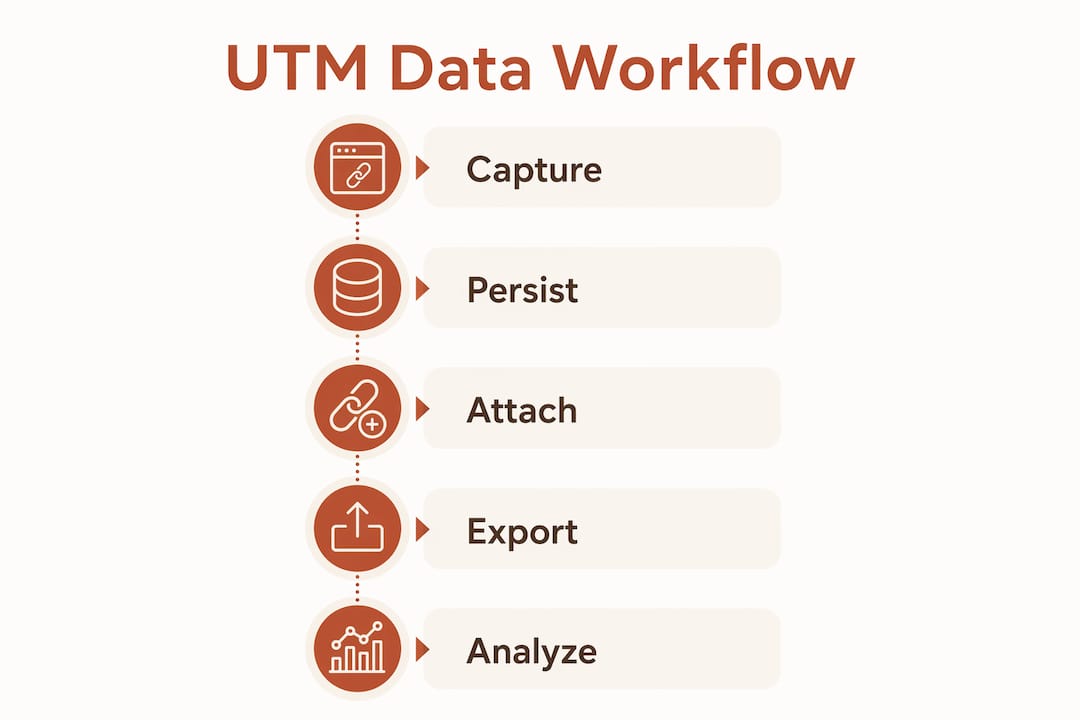
- How to capture, persist, attach, and export UTM data end to end
- UTM naming conventions and governance policy you can copy
- How to analyze UTM data in analytics and AI platforms
- Common UTM problems and how to fix them
- Quick KPI checklist: what to measure with UTM analytics
- Key Takeaways
- A practitioner’s note on what actually breaks UTM analytics
- How Affinsy turns clean UTM data into product and segment intelligence
- Useful sources and further reading
What are the five UTM parameters and how do you format them?
Google’s official documentation defines five standard UTM parameters. Three are required for clean attribution; two are optional but useful in specific contexts.
- utm_source (required): the platform or sender —
google,newsletter,facebook - utm_medium (required): the channel type —
email,cpc,social,sms - utm_campaign (required): the specific campaign name —
spring-launch-2026,onboarding-v2 - utm_term (optional): paid search keyword —
running-shoes,analytics-pricing - utm_content (optional): differentiates links within the same campaign —
header-cta,footer-link - utm_id (optional but recommended): a stable numeric or string campaign ID for cost-data joins and warehouse reconciliation
URL construction rules: the ? separates the base URL from the query string; & separates each parameter pair; parameter order does not affect tracking; all values must be lowercase with hyphens as separators.
Copy-ready example:
https://yourstore.com/products/bundle
  ?utm_source=newsletter
  &utm_medium=email
  &utm_campaign=spring-launch-2026
  &utm_content=header-cta
  &utm_id=camp_4421

Why UTM analytics still matters for e-commerce and SaaS using AI
Third-party cookies are increasingly blocked, and platform click IDs like gclid and fbclid can be stripped in privacy-focused contexts. UTM parameters survive iOS Link Tracking Protection where many click IDs do not, and they are portable across every analytics platform from GA4 to your own data warehouse.
For AI-driven analytics, clean UTM data is the difference between a model that trains on labeled cohorts and one that trains on noise. When you join utm_source and utm_campaign to order records, you can compute campaign-level LTV, identify which traffic sources produce customers who buy product bundles, and build RFM cohorts segmented by acquisition channel. That kind of labeled transaction data is exactly what market-basket and segmentation models need.
UTM analytics shifts traffic analysis from volume to “why” — identifying which creative, channel, and messaging drive the highest-value segments and enabling smarter budget and bundling decisions. Without that signal, AI models trained on transaction data cannot distinguish a high-LTV paid-search cohort from a low-LTV social cohort.
Shopify uses last-click attribution and reads UTM parameters directly from the URL rather than gclid, so teams running Google Ads with Shopify must add manual UTMs to their ad destination URLs. GA4 and Shopify can also report different session counts for the same campaign, which is why attaching UTMs at the order level in your own warehouse gives you a single source of truth.
How to capture, persist, attach, and export UTM data end to end
- Capture on first click. On page load, read all
utm_*parameters fromwindow.location.search. For server-side redirects or shortened URLs, capture parameters in server logs before the redirect fires. - Persist across sessions. Write first-touch UTM values to a server-side session store and a first-party cookie (e.g.,
utm_first_touch, 180-day expiry). Also store them as user properties in GA4 so they survive session boundaries. - Attach to transactions. At checkout, read the persisted first-touch cookie and include all six UTM fields (
utm_source,utm_medium,utm_campaign,utm_term,utm_content,utm_id) in the purchase event payload or as order metadata fields. Join onorder_idin your warehouse. - Export to your data stack. Confirm that UTM fields flow into GA4 session rows, your CRM contact record, and your AI feature store. For automated data pipelines, include UTM fields as first-class columns alongside
order_id,customer_id, andrevenue. - QA before launch. Simulate a click path: open the tagged URL in an incognito window, complete a test order, then verify the UTM values appear in GA4’s Traffic Acquisition report and in the order metadata in your warehouse or Shopify admin.
Partial tagging warning: GA4 stops inferring source/medium from the referrer the moment it detects any UTM parameter. A URL with only utm_campaign will produce (not set) for source and medium — worse than no tags at all.
Short code example (JavaScript):
// Read and persist first-touch UTMs
const params = new URLSearchParams(window.location.search);
const utmFields = ['utm_source','utm_medium','utm_campaign',
                   'utm_term','utm_content','utm_id'];
if (params.get('utm_source') && !getCookie('utm_first_touch')) {
  const values = {};
  utmFields.forEach(k => { if (params.get(k)) values[k] = params.get(k); });
  setCookie('utm_first_touch', JSON.stringify(values), 180);
}
// At order creation, read cookie and attach to order payload
const firstTouch = JSON.parse(getCookie('utm_first_touch') || '{}');
orderPayload.utm = firstTouch;
UTM naming conventions and governance policy you can copy
Without a central registry, five people across three campaigns will produce five spellings of “facebook” and make your AI training data unusable. Google recommends lowercase, hyphens as separators, and URL builders to prevent manual errors.
| Field | Rule | Allowed examples | Banned examples |
|---|---|---|---|
| utm_source | Lowercase, platform name | google, newsletter, linkedin |
Google, Email List, FB |
| utm_medium | GA4 standard values only | email, cpc, social, sms |
newsletter, ig-post, Paid |
| utm_campaign | [channel]-[name]-[quarter] |
email-spring-q2, cpc-brand-q1 |
Spring Campaign, test |
| utm_content | Describes the creative/placement | header-cta, footer-link |
link1, version A |
| utm_id | Stable numeric or slug ID | camp_4421, 4421 |
(leave blank rather than invent) |
GA4’s default channel grouping maps medium values to channel groups; a nonstandard medium like newsletter lands traffic in “Unassigned” and breaks channel-level reporting. Stick to the GA4 standard vocabulary in the table above.
Governance process: maintain one shared spreadsheet or internal registry as the single source of truth. Any new campaign name requires a review step before links go live. Use a link-builder tool (Google’s Campaign URL Builder or an internal one) to enforce the schema automatically.
Pro Tip: Always populate utm_id with a stable campaign identifier. When campaign names change mid-flight or you import cost data from Google Ads or Meta, utm_id gives you a reliable join key that survives renaming.
How to analyze UTM data in analytics and AI platforms
Recommended schema: store UTM data in two scopes. Session-scoped fields (session_source, session_medium, session_campaign) track the last-touch channel. User-scoped first-touch properties (first_touch_source, first_touch_campaign, first_touch_utm_id) enable LTV and cohort analysis. Use utm_id as the stable join key for cost imports.
Analysis recipes (pseudo-SQL):
Revenue by campaign:
SELECT utm_campaign, SUM(revenue) AS total_revenue,
       COUNT(DISTINCT order_id) AS orders,
       AVG(revenue) AS aov
FROM orders
WHERE utm_campaign IS NOT NULL
GROUP BY utm_campaign ORDER BY total_revenue DESC;
Cohort LTV by first-touch source (90-day window):
SELECT first_touch_source,
       SUM(revenue) / COUNT(DISTINCT customer_id) AS ltv_90d
FROM orders
WHERE order_date <= first_order_date + INTERVAL '90 days'
GROUP BY first_touch_source;
Sample campaign LTV output:
| utm_source | utm_campaign | Customers | 90-day LTV | AOV |
|---|---|---|---|---|
| cpc-brand-q1 | — | — | — | |
| newsletter | email-spring-q2 | — | — | — |
| social-saas-q1 | — | — | — |
For AI feature prep: normalize campaign names to lowercase before encoding, one-hot encode utm_medium, hash utm_id for privacy-preserving joins, and validate that each cohort has sufficient sample size before training. Connecting UTM-driven dashboards to your BI layer makes these queries repeatable for non-technical stakeholders.
Statistic callout: UTM parameters survive iOS Link Tracking Protection contexts where click IDs like
gclidandfbclidare stripped, making them the most portable first-party attribution signal available today.
Common UTM problems and how to fix them
- Inconsistent capitalization.
Facebookandfacebookare two separate values in GA4. Enforce lowercase at the link-builder level, not after the fact. - Partial tagging. A URL with only
utm_campaigncauses GA4 to return(not set)for source and medium. Always include all three required parameters together. - Internal links overwriting acquisition. Never add UTM tags to links between your own pages. Internal UTMs reset the traffic source and corrupt campaign data — one of the most common analytics mistakes teams make.
- Auto-tagging conflicts. Shopify does not read
gclid. If you rely on Google Ads auto-tagging for GA4 but use Shopify for order attribution, you need manual UTMs on your ad destination URLs as well. - Multiple taggers, no registry. Without a shared naming spreadsheet, campaigns accumulate dozens of spelling variants that fragment reporting and corrupt AI training sets.
Debug checklist: (1) Open the tagged URL in an incognito window. (2) Inspect the final landing URL in the browser address bar. (3) Check the first-touch cookie value in DevTools. (4) Confirm the joined UTM fields on the test order in your warehouse. (5) Compare GA4 Traffic Acquisition with Shopify’s UTM report for the same date range.
Quick KPI checklist: what to measure with UTM analytics
- Sessions by source/medium — baseline volume; confirms tags are firing.
- Conversion rate by utm_campaign — which campaigns actually close.
- Revenue and AOV by utm_campaign — separates high-volume from high-value campaigns.
- 90-day LTV by first-touch utm_source — the metric that changes budget allocation decisions most.
- Retention and repurchase rate by campaign cohort — critical for SaaS and subscription e-commerce.
- Product affinity lift by campaign — does traffic from
cpc-brandbuy bundles at a higher rate thanemail-spring? This feeds directly into market-basket analysis. - Cost per acquisition — available once you join cost imports using
utm_idas the key. - Revenue per UTM-driven segment — the output of RFM segmentation weighted by campaign LTV.
Priority tags to capture for AI use: first_touch_source, first_touch_campaign, last_touch_campaign, and utm_id when available. Conversion tracking tied to these fields gives your AI models labeled outcomes, not just traffic counts.
Key Takeaways
Clean UTM data attached to orders is the foundation for AI-driven product-association and RFM segmentation — without it, your models train on unlabeled noise.
| Point | Details |
|---|---|
| Three required parameters | Always include utm_source, utm_medium, and utm_campaign on every external link. |
| Persist first-touch UTMs | Write UTM values to a 180-day first-party cookie and server-side session store on first click. |
| Attach UTMs to orders | Include all six UTM fields — utm_source, utm_medium, utm_campaign, utm_term, utm_content, utm_id — in the purchase event payload and join on order_id in your warehouse. |
| Enforce naming governance | Use a shared registry and a link-builder tool; nonstandard utm_medium values land in GA4’s “Unassigned” channel. |
| Affinsy for AI segmentation | Affinsy ingests UTM-tagged transaction data via CSV or API and applies market-basket analysis and RFM segmentation to surface product associations and campaign-driven cohorts. |
A practitioner’s note on what actually breaks UTM analytics
The failure mode I see most often is not a technical one. A team builds a solid capture-and-persist setup, then six months later the AI model starts drifting. The culprit is almost always naming fragmentation: someone launched a campaign without checking the registry, used Social instead of social, and now 15% of the training cohort is mislabeled. Governance is not a nice-to-have process — it is data quality infrastructure.
The fix that made the biggest difference in practice was making utm_id mandatory for any campaign with a cost-data import. Campaign display names change constantly; utm_id does not. When we switched to joining cost data on utm_id rather than utm_campaign, reconciliation errors dropped to near zero and the segmentation model stopped seeing phantom cohorts every time a campaign was renamed. If you implement one thing from this guide today, make it that: enforce lowercase and populate utm_id on every paid campaign before the link goes live.
How Affinsy turns clean UTM data into product and segment intelligence
Most analytics tools stop at reporting sessions and revenue by campaign. Affinsy goes further: it ingests your UTM-tagged transaction data via CSV upload, API, or MCP, then applies AI-powered market basket analysis to surface which products are bought together by customers from specific campaigns. That means you can answer questions like “do customers acquired through paid search buy bundles at a higher rate than email subscribers?” without writing a single custom query.
RFM segmentation in Affinsy is built on the same transaction data, so you can export campaign-driven cohorts directly to Klaviyo, MailerLite, or Omnisend and run targeted retention sequences against them. The free tier covers up to 20,000 line items with no credit card required. Upload a CSV of your order history and see your first product-association and customer segmentation results in minutes.
Useful sources and further reading
- Google Campaign URL Builder — the official tool and parameter reference; use it to enforce formatting rules and generate compliant links.
- GA4 campaign data collection — explains the GA4 rule that any detected UTM parameter overrides referrer inference; essential reading before you build your QA checklist.
- UTM Parameters — Wikipedia — concise history and parameter definitions; useful for onboarding new team members to the standard.
- Complete UTM guide (GA4 focus) — covers
utm_id, channel grouping rules, and medium vocabulary; the most practical single reference for GA4 implementations. - 2026 UTM Tagging Guide — Terminus — covers iOS Link Tracking Protection behavior and why UTMs outlast click IDs in privacy-first contexts.
- Omnichannel measurement context — useful background on tracking UTM impact across channels in a multi-touch environment.
Recommended
- Best Top Ecommerce Analytics Platforms – Expert Comparison 2025 - Affinsy Blog | Affinsy
- Complete Guide to AI in Ecommerce Analytics - Affinsy Blog | Affinsy
- AI-Ready Analytics for E-Commerce and SaaS Teams - Affinsy Blog | Affinsy
- Ecommerce Analytics Trends 2026: Unlocking Growth Through AI - Affinsy Blog | Affinsy